
eIf your business email runs on Amazon WorkMail, you have a deadline. AWS has announced that WorkMail reaches end of support on March 31, 2027, and the service stopped accepting new customers in April 2026. That makes an Amazon WorkMail migration unavoidable for every business still on the platform.
This guide is for small and mid-sized businesses on WorkMail that want to move without losing mail or disrupting daily operations.
Most guides make migration sound like a single task: copy the mail, change a DNS record, done. Our recent Amazon WorkMail migration for a concrete restoration company in Calgary showed otherwise. Copying the mail was the easy part. The real risks sat in the places nobody had looked at in years.
The starting point
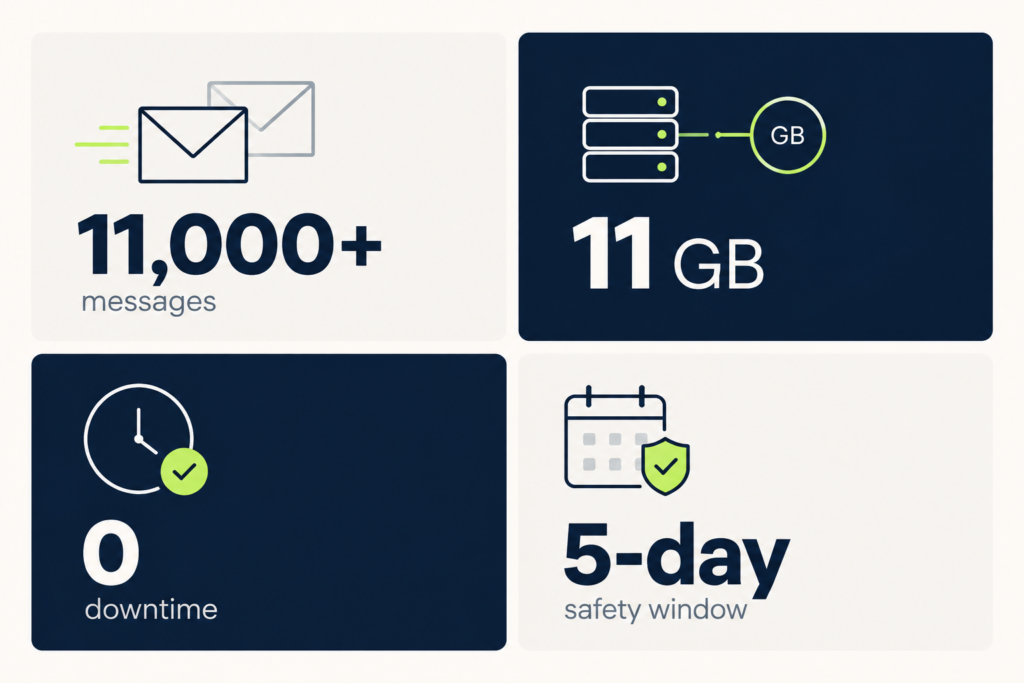
The client is a small, owner-run business with two mailboxes: the owner’s personal address and a shared info@ inbox. Together they held more than 11,000 messages and over 11 GB of mail history, including invoices and customer correspondence going back years. The owner isn’t technical and needed one thing: email that keeps working, with nothing lost.
We set three goals:
- Move every mailbox to a supported platform before the deadline.
- Avoid any downtime the business would notice.
- Leave the environment cleaner and more secure than we found it.
Choosing the destination
AWS suggests several alternative providers, including Kopano Cloud, Zoho Mail, and Zoom Mail, and any established hosted email service can work. In practice, most businesses we talk to are choosing between Microsoft 365 and Google Workspace, because those are the platforms their staff, devices, and other tools already know. Both offer server-side migration tools that pull mail directly from WorkMail over IMAP. That means no syncing through someone’s laptop and no consumer upload limits.
This client didn’t need Teams or Office apps; they needed reliable business email. So we chose Exchange Online Plan 1, Microsoft’s mail-only plan. It is one of the most cost-effective professional email options available, and it fit the business without paying for features they would never use.
Our advice: start from what the business actually uses, not from the most popular bundle.
How we ran the Amazon WorkMail migration
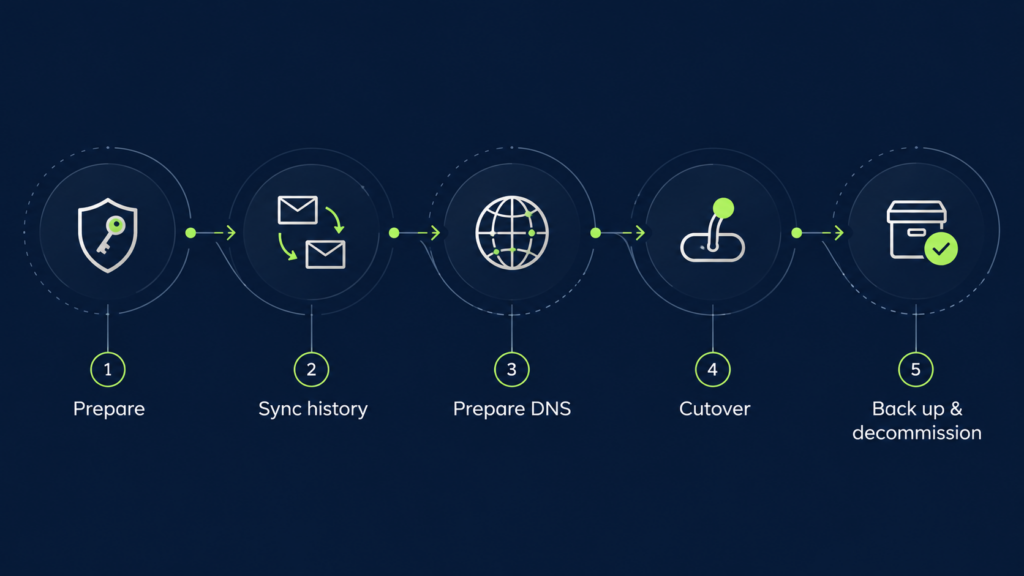
We split the work into phases so the client could keep working throughout.
Phase 1: Prepare without touching mail flow. We set up the Microsoft 365 tenant and verified the domain with a TXT record only, so incoming mail kept flowing to WorkMail. We also created a separate “break-glass” administrator account, which protects admin access if the owner’s phone or credentials ever change.
Phase 2: Copy the history in the background. Using Microsoft’s IMAP migration batch, we pulled both mailboxes from WorkMail into Exchange Online. The tool re-syncs every 24 hours, so new mail kept arriving on both sides while we prepared the cutover.
The shared inbox migrated with a perfect consistency score. On the owner’s mailbox, 8,895 items migrated and the tool flagged just two old forwarded messages from 2023. We reviewed them, confirmed they were informational, and approved them rather than silently ignoring the warning.
Phase 3: Prepare DNS before switching anything. We lowered DNS TTLs so any change would take effect quickly and could be reversed quickly. We set up autodiscover and published Microsoft’s DKIM signing keys before the cutover.
Phase 4: Cut over. We switched the MX record to Microsoft 365 on a planned date, ran a final sync, and reconfigured the owner’s devices. One practical note: an Outlook profile can’t be redirected from WorkMail to Microsoft 365. The account must be removed and added again, which is worth planning for with non-technical users.
Phase 5: Back up, observe, then decommission. We didn’t delete WorkMail right away. We exported every mailboxto a private, encrypted Amazon S3 bucket and verified each export with cryptographic hashes. Then we waited five days to confirm that no mail was still arriving at the old system. Only after that did we delete the WorkMail organization and clean up every migration artifact.
The 5 hidden risks we found
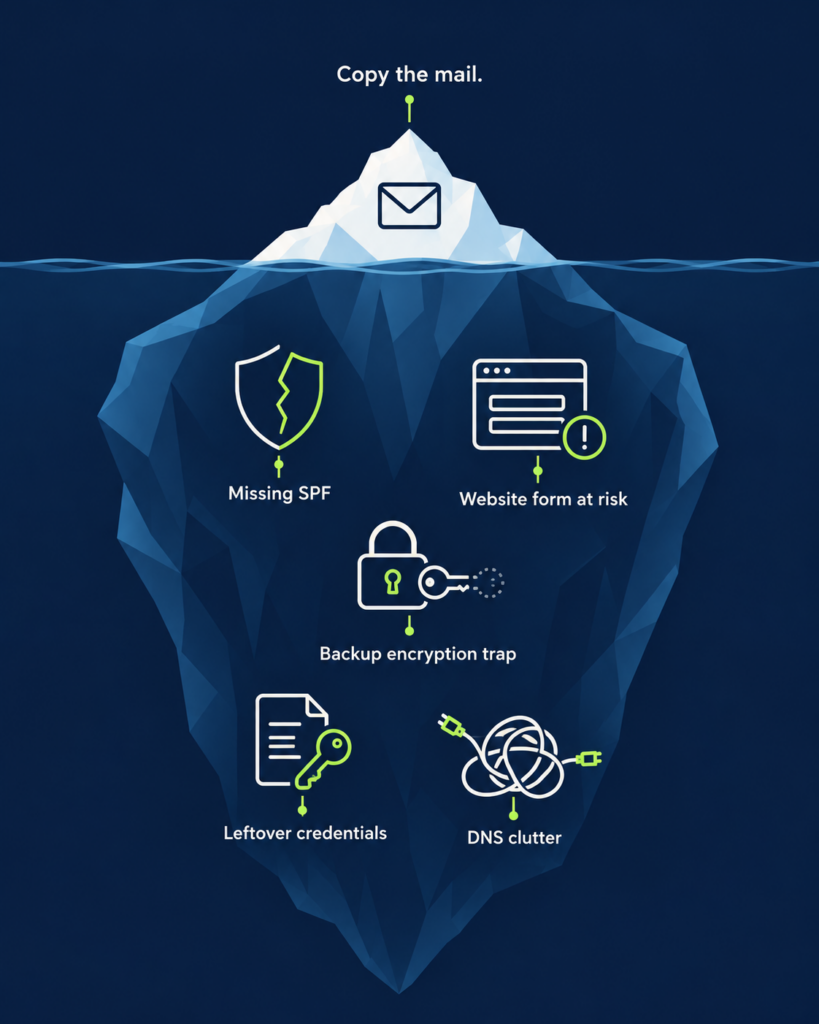
This is where an experienced partner pays for itself. None of these issues appear in a typical “how to migrate” checklist.
1. The domain had no SPF record at all. SPF tells other mail servers which systems are allowed to send email for your domain. Without it, the client’s mail was easier to spoof and more likely to land in spam. We published a correct SPF record covering Microsoft 365 and Amazon SES.
2. The website contact form depended on the old email setup. WorkMail sends its outgoing mail through Amazon SES, and the company’s WordPress site uses that same SES configuration to deliver quote requests. Deleting the wrong thing would have quietly broken the main source of new customer leads. We also discovered that the form had never delivered reliably since the site launched.
We fixed it properly: a dedicated sending subdomain for proper authentication, the WP Mail SMTP plugin with credentials stored outside the database, and a verified test delivery. Before deleting WorkMail, we confirmed in AWS documentation that the website’s email identity would survive, and we verified it again afterwards.
3. Backups can become unrecoverable. WorkMail exports are encrypted with a key you manage. If that key is ever deleted, the backup becomes unreadable. We re-encrypted the backups with storage-managed encryption before retiring the key, so the client’s archive stays readable long term.
4. Migration tools keep credentials. Microsoft’s IMAP migration batch stores a file containing the source mailbox credentials, so a stopped batch left in place means those credentials stay behind. We deleted the batch and its connection endpoint once the work was done.
5. Old services leave DNS clutter. We found leftover records from a previous email provider and removed them, leaving a DNS zone that is clean and easier to manage.
The results
- Every mailbox migrated: more than 11,000 messages and 11 GB of history.
- No downtime noticed by the business.
- Verified, encrypted backups of the original mailboxes.
- SPF and DKIM email authentication in place, where previously the domain had none.
- A website contact form that delivers leads reliably for the first time.
- A clean decommission, with no orphaned credentials, keys, or access left behind.
- A handover guide in the client’s preferred language, plus a guided session to move two-factor authentication to the owner’s own phone.
Questions to ask before your Amazon WorkMail migration
If you’re still on WorkMail, these questions will tell you how ready you are:
- Do you know every system that sends email using your domain, such as a website, invoicing tool, or CRM?
- Does your domain have valid SPF, DKIM, and DMARC records today?
- Do you have a backup plan for your mail history, and have you tested that you can actually open it?
- Who keeps admin access if a key person leaves or loses their phone?
- Do you need a full productivity suite, or just reliable business email?
If any answer is “I’m not sure,” that’s normal. It’s also exactly where migrations go wrong.

Let’s plan your move
At Origo, we help businesses adopt cloud and AI technology with clarity, and with the people who depend on it in mind. Moving off WorkMail is a good opportunity to fix what has quietly broken over the years, not just move it somewhere new.
The deadline is closer than it looks. Contact Origo to schedule an Amazon WorkMail migration assessment. We’ll map your current setup, flag the hidden risks, and recommend the right destination for your business.

Ready to explore what AI can do for your team?